
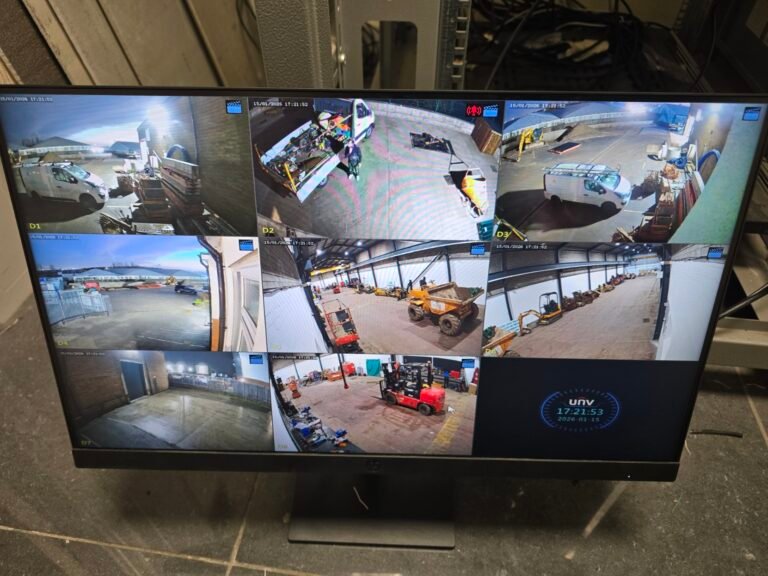
Common CCTV faults we investigate
CCTV faults can look similar on the screen even when the cause is different. Guessing can mean replacing working equipment, so we work through the relevant signal, network, power and recorder path before recommending parts.
- One or more cameras showing 'no video' on the recorder
- NVR / DVR not recording or reporting a storage fault
- Remote-viewing app stopped working after a network change
- Picture has gone foggy, washed out or pink
- Night vision dim, patchy or not switching correctly
- Intermittent cameras or repeated dropouts
- Whole system offline after a power or network event
- Unexpected gaps in recorded footage
Diagnosis — use the right test at the right point
Depending on the system, diagnosis can involve checking camera power/PoE, cable continuity and terminations, direct camera video, IP addressing and network reachability, recorder channels, storage health and the manufacturer's own diagnostics. A CCTV tester can be useful on compatible systems, but it is not a universal one-tool answer for every analogue, IP, PoE, recorder or app fault. We use the checks that fit the actual architecture before quoting replacement equipment.
Why CCTV systems fail
Common causes include water ingress or corrosion at an external connection, damaged cabling, a failed PoE port or power supply, storage faults, recorder configuration problems, network changes, software/firmware issues and camera hardware faults. Age alone does not identify the failed component, and there is no universal number of years at which a camera, recorder or surveillance hard drive should be assumed dead. We diagnose the symptoms and condition of the installed system instead.
Hard drive faults & important footage
A beeping recorder, playback failure or disk-health warning can indicate a storage problem, but the recorder's actual alarm or diagnostic information should be checked first. Where a drive has failed or is no longer suitable, we replace it with storage specified for the recorder capacity, workload and retention requirement. Surveillance drives such as WD Purple or Seagate SkyHawk are designed for surveillance workloads, but their service life still depends on workload, temperature, power events, recorder behaviour and the individual drive — there is no honest fixed 3–5 year lifespan to promise. If footage may be needed for an incident or insurance matter, we avoid unnecessary formatting or overwriting while the recovery options are considered.
Useful checks before changing recorder settings
If live view works but playback does not, start with our CCTV live-view but no-recording guide. If the app says the system is offline, use our CCTV without-internet guide to separate broadband loss from a local recorder or camera fault. For storage and overwrite behaviour, see the CCTV retention guide. Avoid formatting or resetting equipment while potentially important footage is still being assessed.
App and remote-viewing fixes
Remote access can stop after a router or broadband change, an IP/addressing change, an account issue, a manufacturer service problem or a change to the recorder's network settings. We trace whether the local CCTV system is healthy first, then re-establish supported remote access where practical. Manufacturer P2P/cloud services can reduce the amount of manual router configuration required, but they remain dependent on the vendor service, account security, firmware and the site's internet connection, so we do not promise that one setup can never be affected by a future router or platform change.
Repair or replace? Compare the whole system
The right answer depends on what has failed, the condition and compatibility of the remaining cameras/cabling/recorder, the image quality the customer now needs, parts availability and the cost of restoring the existing system. A single fault on a serviceable system may be an easy repair; several incompatible or obsolete components can make an upgrade better value. We explain the options rather than using an arbitrary five-year age or 1080p resolution as the point where a system should be replaced.
Inherited CCTV and system takeover
Moved into premises with cameras already installed, or lost contact with the original installer? We can assess supported systems installed by another company. Start with the camera and recorder models, the visible fault and any documentation. We establish ownership and authorised access before changing accounts or settings; missing credentials do not justify bypassing access controls.
Assess the cameras, recorder and network before replacing them
A takeover assessment can cover camera condition and useful views, cabling and PoE/power, NVR/DVR channels, recording and storage, network addressing and supported app access. Poor documentation may need tracing and labelling before a reliable repair scope can be agreed. We explain what can be retained, where a partial upgrade is sensible and where unsupported or incompatible equipment limits the options. Any charge for hands-on investigation is explained first.
Support after a CCTV repair or takeover
For suitable commercial premises, business network support can include agreed continuing infrastructure support alongside the cameras and recorder. We confirm the supported equipment, authorised access and responsibilities before taking it on. Eligible installation and repair work is covered by our 24-month parts-and-labour guarantee. Full terms depend on the equipment supplied and the work completed.
What affects the cost of a CCTV repair
Once the repair scope is understood, we agree the price before the repair starts. If hands-on diagnosis is needed first, we'll explain any charge before diagnostic work begins. Cost depends on the fault, system architecture, access, cable route and the parts that are genuinely required. Some symptoms can be discussed from photos, model details and screenshots before the visit; faults that depend on measurements or recorder diagnostics need to be assessed before an accurate repair scope can be fixed. Ring the office on 0161 399 1757 or send a WhatsApp.
Local CCTV repair cover across Stockport
We cover Stockport, Cheadle, Bramhall, Hazel Grove, Marple, Romiley, the Heatons, Offerton, Edgeley and surrounding areas. Where the existing system is no longer sensible to repair, see our CCTV installation & upgrade service. We can also look at related smart doorbell or network issues where they form part of the same fault.
Useful CCTV fault guides
These separate recorder and connectivity faults before working equipment is replaced or important footage is put at risk.
CCTV Repair near me — Stockport & Greater Manchester
Searching for cctv repair near you? Our engineer is based in Stockport (SK6) and covers the whole borough plus surrounding Greater Manchester, north-Cheshire and High Peak areas. Short-notice appointments may be available depending on location, workload and the work required.
- Stockport
- Cheadle
- Heaton Chapel
- Offerton
- Edgeley
- Davenport
- Bramhall
- Hazel Grove
- Marple
- Romiley
- Woodley
- Bredbury
- Compstall
- Poynton
- Hyde
- Gee Cross
- Oldham
- Rochdale
- Macclesfield
- Buxton