
Quick answer
If your Wi-Fi keeps disconnecting, first work out what is actually dropping. One device, one room, every wireless device, or the whole internet connection point to very different faults. Do that before replacing the router, adding another booster or upgrading the broadband package.
"The Wi-Fi keeps dropping" sounds like one fault, but it describes several completely different problems. A laptop that disconnects while every other device stays online is not the same problem as a whole house losing internet, and a dead patch upstairs is not the same as a broadband line going down. The quickest route to a lasting fix is to separate those symptoms before buying anything.
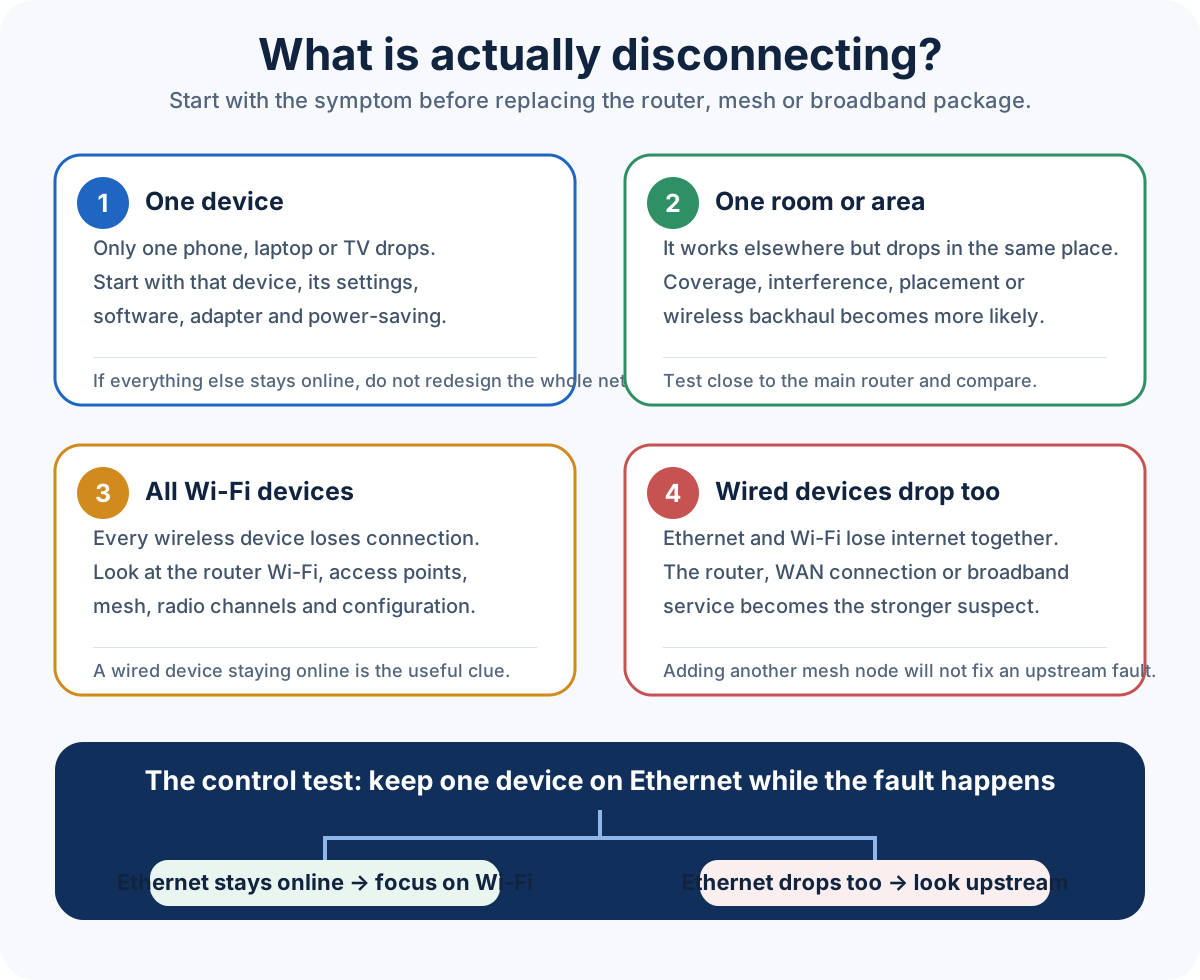
Start here: what exactly is disconnecting?
Wi-Fi and internet are not the same thing
Your device can have a perfectly good radio connection to the router while the router has no working internet connection. It can also be the other way around: the broadband connection can be healthy at the router while a phone in the back bedroom cannot hold a stable Wi-Fi link.
If the symptom is mainly slow performance rather than disconnects, our guide to broadband speed versus Wi-Fi speed explains the difference in more detail.
1. Weak coverage can become an unstable connection
At the edge of coverage, Wi-Fi does not simply get slower in a neat straight line. Devices retry transmissions, shift data rates and sometimes give up on the connection altogether. That is why a phone can look fine near the router and repeatedly disconnect in one bedroom, extension or garden office.
Thick masonry, several floors, foil-backed insulation, metalwork, mirrors and the position of the router all change how far a useful signal travels. If the problem always happens in the same place, treat it as a coverage problem first. Our Wi-Fi dead-spots guide covers the sensible fixes in order.
2. Interference can make a strong-looking signal unreliable
Signal bars do not tell the whole story. A device can receive a strong signal and still have a poor connection if the channel is busy or there are competing networks and devices using the same airtime. Dense terraces, flats and busy offices are more likely to expose this than an isolated property.
The answer is not automatically "turn the power up". Channel use, radio placement and how the access points overlap matter. A proper fix starts by confirming what is actually happening rather than forcing every radio to maximum transmit power.
3. If only one device drops, test the device first
When fifteen devices stay connected and one laptop keeps falling off, the network may be fine. Forgetting and rejoining the network, installing operating-system and Wi-Fi-adapter updates, checking power-saving settings and testing the same device close to the router can quickly show whether the problem follows the device.
A useful cross-check is another device in the same position. If one works reliably and the other does not, avoid redesigning the whole house around a single faulty client.
4. If all Wi-Fi drops but Ethernet keeps working, look at the wireless network
A wired laptop or TV is a useful control test. If it keeps using the internet while every wireless device loses connection, the incoming broadband line is less likely to be the cause. The fault is more likely to sit in the router's Wi-Fi, a mesh system, an access point or the way those devices are configured.
Rebooting can temporarily clear a software problem, but a network that needs regular reboots has not been fixed. Recurring faults deserve a reason, not a restart schedule.
5. If wired and wireless devices drop together, stop chasing Wi-Fi
If an Ethernet-connected device loses internet at the same moment as the wireless clients, stop treating the radio link as the common point. Check the provider's own live service-status or fault page, then record the router or modem WAN state and any event log around the exact dropout time. Keep a known-good Ethernet client connected through a representative failure window and note whether local gateway access, DNS and public internet fail together or separately. If the router is rebooting or losing its upstream connection, fix that WAN, modem or gateway fault before changing mesh nodes or access points.
6. Disconnects while moving around the property usually point to roaming
Homes with an ISP router, an extender and a mesh kit can accidentally end up with several overlapping wireless networks. Devices may cling to a weak radio for too long or jump between nodes badly. A properly designed multi-access-point network should make movement boring: the device changes radio without the user noticing.
If your problem is specifically a Deco, eero, Orbi, Nest or other mesh system dropping out, use our dedicated guide on why mesh Wi-Fi keeps dropping rather than repeating the same troubleshooting here.
7. More mesh nodes can make the wrong problem worse
A mesh node still needs a good path back to the main node. Putting one deep inside the area that already has poor signal can give you a strong-looking connection to a node that itself has a weak backhaul. Adding more nodes also creates more radio traffic and more hand-offs to manage.
When the building defeats wireless backhaul, wiring the node or installing a wired access point is usually more predictable. Our comparison of mesh Wi-Fi versus wired access points explains when each approach makes sense.
Four checks to do before buying another router or booster
- Check whether one device or every device is affected.
- Test close to the main router. If the problem disappears, coverage becomes the priority.
- Keep one known-good device on Ethernet through the fault window. Record the time and whether it can still reach the local gateway and public internet; compare that with the router/modem WAN status and event log before blaming Wi-Fi.
- Notice the exact failure. Does the Wi-Fi network disappear, or does the device remain connected but say there is no internet?
Those four observations are often more useful than ten screenshots from a speed-test app.
When a professional Wi-Fi survey is worth it
If the fault affects several rooms, changes as you move around, involves multiple mesh nodes or keeps returning after basic checks, testing the property is usually quicker than buying more kit. We look at coverage, backhaul, cabling opportunities and the existing router before recommending a solution. For planned work, see our Wi-Fi and home network installation service.
Frequently asked questions
Why does my Wi-Fi keep disconnecting and reconnecting?
First establish whether it affects one device or the whole network. One device points toward that client; several devices in one area point toward coverage; all wireless devices dropping together points toward the wireless network; wired and wireless dropping together points further upstream.
Can a weak Wi-Fi signal cause disconnections?
Yes. At the edge of useful coverage, retries and changing data rates can make a connection unstable rather than merely slow. If the fault is tied to one room or floor, coverage is a strong place to start.
Why does Wi-Fi disconnect when I move between rooms?
That often indicates a roaming or hand-off problem between the router, mesh nodes or access points. Multiple overlapping networks and badly placed nodes can make devices cling to the wrong radio.
Will faster broadband stop Wi-Fi disconnecting?
Not if the fault is inside the property. A faster package can improve the connection arriving at the router, but it cannot fix weak coverage, interference or poor wireless backhaul.
Should I buy a new router first?
Usually not as the first diagnostic step. Work out whether the problem follows one device, one area, the wireless network or the whole internet connection first. That tells you whether a new router is even aimed at the fault.
Clear written quotation before any chargeable work. Short-notice appointments may be available across Stockport, Greater Manchester and Cheshire.