
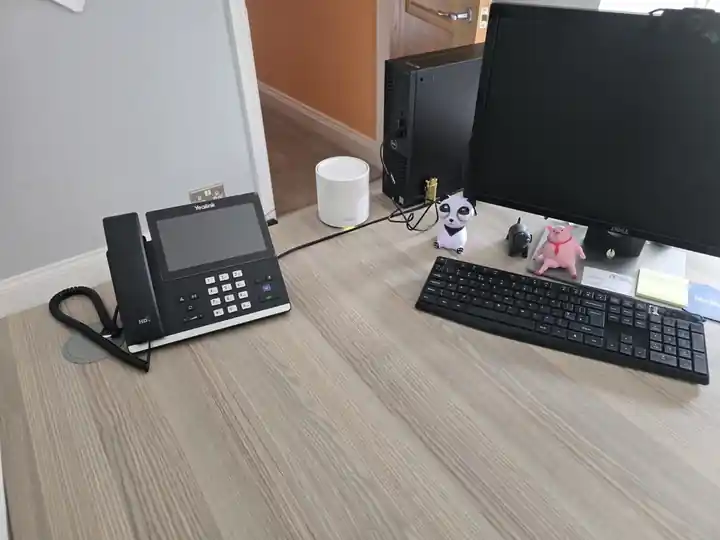
Business calls that fit the way you work
One familiar number
Keep the number customers know where it can be ported to the chosen service.
The right devices
Desk phones, mobile apps or desktop softphones to suit the team.
Clear call handling
Agree who rings, what happens out of hours and where missed calls go.
A sound network underneath
Internet, Wi-Fi and cabling considered alongside the phone system.
A business phone system that actually fits how you work
Whether it's three handsets in a small office, twenty across a care home, or a team working from home — a hosted business phone system means everyone can share the same number, call menu and voicemail setup. The technology underneath is VoIP, but you don't need to know the jargon; we size and configure the system around the business.
What's included
We handle the practical parts — number porting, handsets, call routing, voicemail, mobile apps and on-site setup. You get one engineer who looks after the change from start to finish.
- Hosted VoIP / cloud telephone system
- Number porting from BT / other providers
- Desk handsets and / or softphone apps
- Call menus, hunt groups, hold music
- Voicemail-to-email / transcription where supported
- Ongoing local support
What happens when a customer calls
A business call, in plain English
Your business number
Customers keep one familiar way to reach the team, where the number can be ported.
Hosted phone system
Your agreed opening hours, call menu and ring groups decide where the call goes.
Desk phones
Reception and office workstations
Apps
Compatible mobile or desktop apps
Voicemail / routing
Your agreed missed-call or out-of-hours plan
Illustrative call flow. Number portability, features, app behaviour and licences are confirmed for the chosen platform. Phones and apps need a suitable internet connection and power.
Local experience with phones and the network
Real business phone system — Greater Manchester care home
On a live care-home project, Evolution later took responsibility for the site's VoIP telephone system after upgrading and taking over the managed network.
We supplied, configured and provisioned four VoIP phones and now support the telephone system alongside the network, giving the home one local technical contact for both connectivity and calls.
Desk phones, apps and useful features
Desk phones, mobile apps or both
A hosted system can give staff the business number on compatible desk phones, mobile apps and desktop softphones, depending on the chosen platform and licences. That can suit an office where some people stay at a desk and others move between sites or work remotely. Exact call handoff, presence and app behaviour are platform-dependent, so we configure the workflow the team actually needs rather than promising every device behaves identically.
- Desk handsets for fixed workstations and reception
- Mobile apps for staff who move between locations
- Desktop softphones where a PC-based workflow makes sense
- One business number with routing to the right people
- Call groups and out-of-hours rules where required
- Platform features confirmed before quoting
Features people actually use
We turn on the features that earn their keep — and leave the rest off so the system stays simple.
- Auto-attendant ('press 1 for sales')
- Hunt groups so calls ring multiple desks
- Out-of-hours routing to voicemail or mobile
- Call recording where appropriate and legally compliant
- Voicemail-to-email with transcription where supported
- Mobile and desktop softphone apps
- Microsoft Teams / CRM integration where supported
- Reporting on missed and answered calls
Keep the number. Plan the changeover.
A planned move to hosted VoIP
- 01Review the current service
Check numbers, provider details, devices and anything using an analogue line.
- 02Agree the call plan
Confirm platform features, users, licences and internet requirements.
- 03Coordinate the port
Agree the provider window and keep the old service active until the port is confirmed.
- 04Test and hand over
Check incoming and outgoing calls, routing and how staff use the system.
Keep the business number your customers already know
Existing business numbers can often be ported to a compatible hosted system, but portability depends on the number, current provider and service status. Do not cancel the old service before the port is confirmed. We check the number and existing arrangement first, then plan the new handsets, call routing and agreed changeover around it. For the detail, see our business number-porting guide.
Plan the switchover before the porting date
The new users, handsets, mobile apps, call groups and routing can be prepared before the number moves so the system is ready for the agreed porting window. Provider lead times and porting windows vary. If a weekend or out-of-hours changeover is important to the business, tell us at quotation stage: engineer availability, provider constraints and the exact cutover plan must be agreed before any date or time is promised.
The phone system is only part of the picture
What happens if the internet or power fails?
Hosted VoIP depends on working connectivity and powered network equipment. A second internet connection, suitable router policy, UPS-backed network equipment or alternative call routing can reduce some failure modes, but none of those should be described as guaranteed uninterrupted calling.
Our VoIP power-cut and resilience guide explains the internet, router, switch, handset and power dependencies. Where continuity matters, we design the phone system alongside the business internet and backup connection rather than treating telephony as an isolated service.
Replacing old or unreliable business phone lines
If the existing landline crackles, drops calls, has awkward forwarding or simply no longer fits the business, a hosted phone system can move the number away from the old setup and give you proper call handling. The wider withdrawal of legacy PSTN and ISDN services is another reason businesses are moving toward hosted VoIP. Door entry systems, lift phones, alarm diallers and other equipment that still depends on an analogue line should be checked as part of the change rather than assumed to work automatically.
Works alongside your network
A hosted phone system needs a stable connection — if your office Wi-Fi, firewall or cabling is patchy we'll look at the network underneath it too. See commercial network installation and business internet.
Dental practices can also view our dedicated dental-practice phone, WiFi and connectivity support.