
Quick answer
A slow business network needs the fault locating before it needs new equipment. Compare an affected device with a known-good wired connection, separate local network performance from internet access, then follow the failing path through the cable, switch, gateway and Wi-Fi. A broadband speed test on its own cannot tell you which part is wrong.
“The internet keeps dropping” can mean the whole office loses its incoming connection. It can also mean the reception access point keeps restarting while the wired desks carry on working. Those are different jobs. The first useful question is who loses what, where and when.
For a business, the cost of guessing is not just another router. Changing several things together can interrupt working systems and remove the evidence of an intermittent fault. Our business network fault-finding service starts with the symptoms and the route affected devices actually use.
Internet speed and local network performance are different
The local area network, or LAN, connects the devices inside your premises. The wide area network, or WAN, is the route out to the internet. A local file transfer or supported local printer can expose a LAN problem without depending on the broadband line. Cloud software depends on both layers, plus the remote service itself.
If local traffic is healthy but several unrelated internet services fail from a wired test device, investigate the gateway and incoming connection. If one department struggles to reach local devices while the rest of the office works, follow that department’s switch and uplink first. Neither observation proves the diagnosis, but both narrow the next test.
A healthy download result does not rule out brief packet loss, unstable upload performance or a fault that happens only at busy times. Record the time and test conditions alongside the result. One slow laptop can also have an adapter, software or VPN issue that other users do not share.
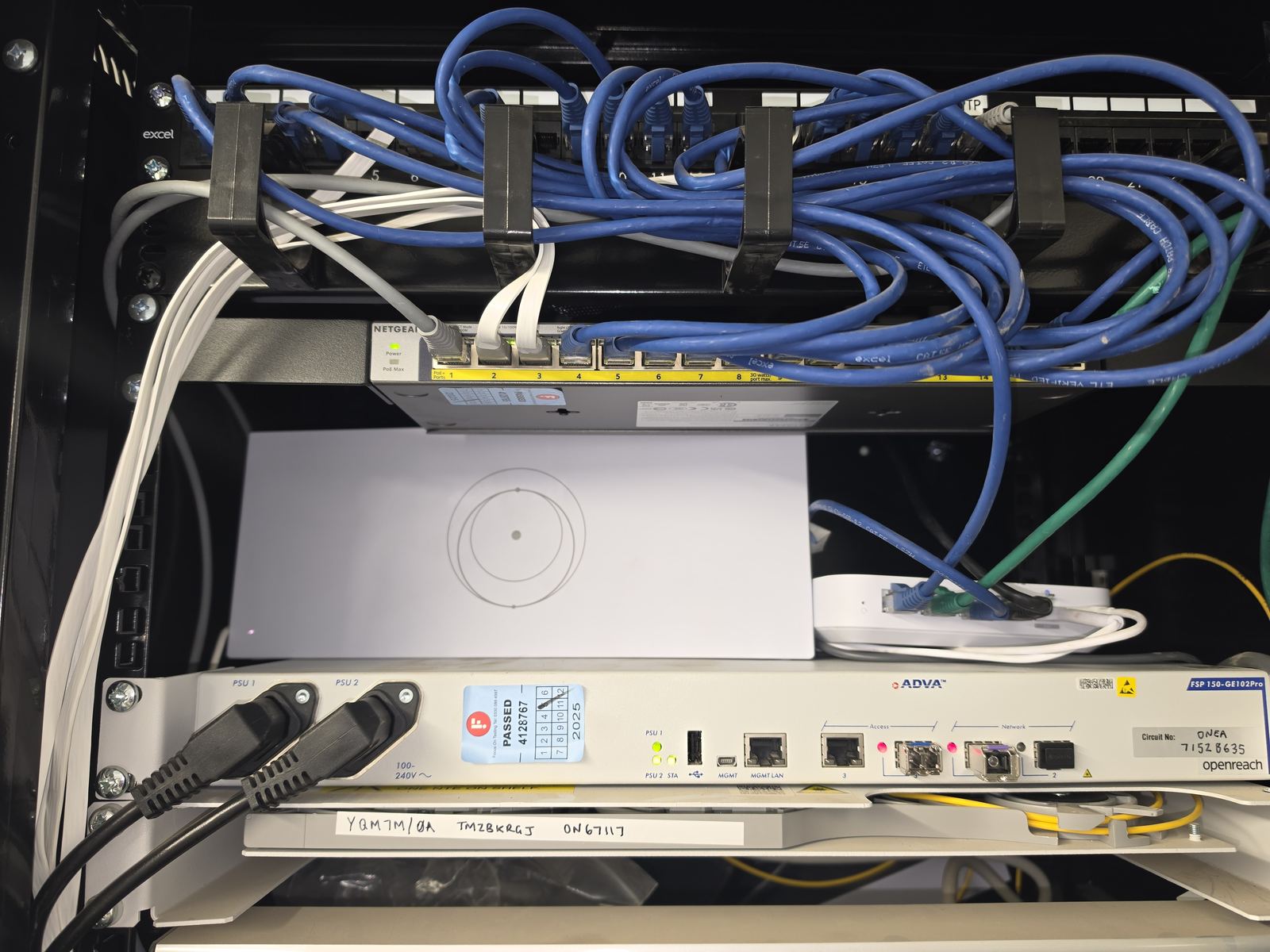
Cabling and terminations: a link light is not a clean bill of health
A damaged patch lead, crushed permanent cable or poorly terminated outlet can produce a dead port, intermittent link or lower negotiated speed. Check both patch leads as well as the permanent run. A cable labelled Cat6 still depends on suitable components and sound terminations.
A basic wire-map check is useful, but it does not certify the link’s performance. An engineer can compare known-good leads and ports, inspect terminations and use testing appropriate to the symptom. If repair or a new route is justified, our data cabling installation service covers the physical work. Replacing every cable because one outlet fails is rarely a sensible starting point.
Switches, uplinks and PoE can be the bottleneck
An old 10/100 switch limits traffic through its ports even when the broadband service is much faster. Equally, a gigabit-capable port negotiating at 100 Mbps may point to a cable, adapter or configuration issue. Check what both ends support and what they actually negotiate before deciding that the switch is obsolete.
Several busy users may share one constrained uplink. Port errors, overloaded links, inappropriate settings and failing hardware can produce similar complaints. Review available counters and logs under the conditions that trigger the fault. A quiet lunchtime test may miss a problem caused by simultaneous backups or camera traffic.
Power over Ethernet, or PoE, powers compatible access points, cameras and phones through the data cable. An access point that disappears may have lost power rather than radio coverage. Check its uptime, cable, switch power budget and supported PoE requirements. A failing injector or switch power supply is another possibility; changing wireless channels will not fix it.
When the problem really is Wi-Fi
Use a wired comparison on the same network to help separate radio problems from upstream faults. Poor access-point positions, interference, congested channels and weak wireless backhaul can all make Wi-Fi unreliable even when the incoming service is healthy.
Consumer mesh is not automatically unsuitable, but a business spread across rooms or floors may be better served by deliberately positioned access points with wired backhaul. Adding another node without checking its connection back to the network can simply extend the problem. Our business Wi-Fi survey guide explains the measurements that help make that decision.
Loops, configuration and an undocumented cabinet
An accidental extra connection between switches can create a loop if the topology and loop protection are not designed correctly. Other faults include conflicting address allocation, an incorrect VLAN on a port or an unintended router added behind the existing gateway. These need configuration and topology checks, not random unplugging.
Old cabinets make diagnosis harder when nobody knows which cable serves reception, the phones or a second building. Document connections before changing them. A switch cascade may be intentional; an unidentified cable may still carry a critical service.
A practical diagnostic sequence
- Define the failure. Record affected devices, areas, applications, times and recent changes. Note what continues to work.
- Preserve the evidence. Save relevant logs, status screens and a patching record before resets or disconnections.
- Establish a wired control. Use a suitable known-good device, lead and authorised port. Compare local and internet traffic without bypassing the firewall.
- Follow the failing branch. Check patch leads, outlets, switch ports, uplinks, power and negotiated link speeds.
- Check configuration and radio conditions. Review addressing, network separation, topology and Wi-Fi where the earlier tests point.
- Change one justified thing. Agree any interruption, keep a rollback route and repeat the original failing task.
- Confirm recovery. Test affected users under representative load and record the repair, remaining limits and any provider escalation needed.
Remote management can help where access and logs are available. It cannot inspect a damaged cable, trace every unknown outlet or reproduce every on-site condition. If evidence points to the ISP, give the provider the timing and control-test results so the investigation can move forward.
Repair the cause, then make the network easier to support
The proportionate answer might be one termination, a replacement power supply or a corrected setting. Wider changes make sense when the evidence shows a capacity or design problem. EDD works across Stockport, Greater Manchester, Cheshire and suitable North West projects, with the repair scope agreed before work starts.
For the supporting decisions, read when existing Cat5e can remain useful and when a cabinet tidy or rebuild is justified. Both start with the condition of the network you have.
Clear written quotation before any chargeable work. Short-notice appointments may be available across Stockport, Greater Manchester and Cheshire.