
Quick answer
A cabinet needs attention when its condition makes the network unreliable, difficult to access or hard to understand. Tracing, labelling and repatching may be enough. Replace equipment only for an identified fault, capacity, support or compatibility reason. A full rebuild needs a stronger justification than wanting a neater photograph.
A cupboard can accumulate a switch for the new office, an injector for another access point and several “temporary” power supplies. Eventually nobody is confident about what can be disconnected. The network may still work, but a straightforward fault becomes a tracing exercise before repair can even start.
EDD’s network cabinet tidy and rebuild service aims to improve reliability, serviceability, fault finding, documentation and future maintenance. Appearance is useful when it makes those things easier.
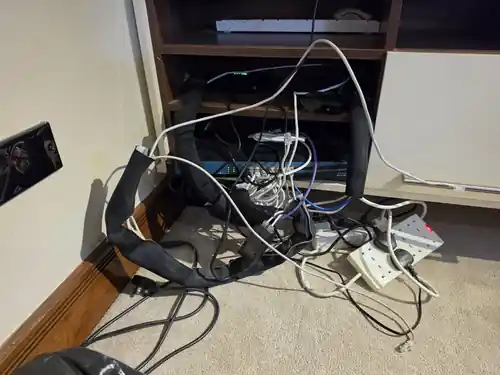
Signs the cabinet is getting in the way
Tangled or unidentified patch leads make it difficult to follow a connection without disturbing others. Long loops can cover port labels and equipment indicators. Leads stretched tight across the front of a switch can make replacement awkward, even if the data link currently works.
Unsupported equipment has two meanings worth checking: boxes may be physically resting on other equipment or hanging from cables, and some products may no longer receive manufacturer support. Neither is resolved by hiding the box at the back. Check appropriate shelves or mounts, ventilation, access and the equipment’s current support status.
Daisy-chained switches and unmanaged additions deserve mapping, not automatic removal. A small local switch can be a perfectly sensible design choice. Problems arise when nobody knows the uplink path, several users share a constrained connection or an accidental second link creates a loop.
Abandoned cables, poor patching, unlabelled power supplies and inaccessible devices all add uncertainty. An apparently unused cable can still serve a seasonal device, phone or remote part of the site. Verify both ends and get agreement before removing it.
A tidy, a targeted upgrade or a full rebuild?
A full rebuild should explain what the existing arrangement cannot do, what will be retained and why each replacement is needed. Keeping serviceable equipment is often the proportionate answer. A consistent logo across the front of the cabinet is not a technical requirement.
Which equipment genuinely needs replacing?
Old 10/100 hardware may constrain an uplink or busy group of users, but a low-bandwidth device does not automatically need a faster port. Check traffic and negotiated link speed against the intended task. A link unexpectedly running at 100 Mbps can also indicate a cabling problem rather than an outdated switch.
A failing power supply, repeated unexplained restarts or insufficient PoE capacity requires investigation. Power over Ethernet supplies supported devices through the data cable; the switch’s total power budget and each port’s capability both matter. A cupboard full of separate injectors may be worth simplifying, but only after checking the devices and consequences of concentrating them on one switch.
Review unsupported firmware, unsuitable management access and unavailable replacement parts with the person responsible for the network. Remove genuinely unnecessary equipment only after identifying its role. If the cabinet is part of an active fault, business network diagnosis and repair comes before cosmetic changes.
Record the network before unplugging it
Photograph the original arrangement and map panel ports, outlets, switch ports, uplinks and power connections. Identify the provider’s handoff equipment and any third-party managed devices. Configuration backups and authorised access should be available where relevant, with credentials kept securely.
The useful record links a label to a real destination and function. A numbered patch panel with no outlet schedule still leaves the next engineer guessing. Note which ports carry particular networks and which equipment supports phones, CCTV, reception or other important areas.
Our structured cabling guide explains that labelling and testing layer. Where damaged or unsuitable permanent links need work, the data cabling service covers the installation scope.
Plan the interruption and the rollback
Repatching active connections can interrupt users. Agree an appropriate work window, critical services, who can authorise changes and how staff will be told. Do not promise a no-downtime tidy without a design and method that support it.
Work in identifiable stages, preserve a way back and test each affected service. Keep provider equipment within its ownership boundary. Suspected mains faults, damaged electrical distribution or unsuitable power arrangements need the appropriate electrical professional; rearranging patch leads does not resolve them.
Cable management should support suitable bend radii, clear access and reasonable service slack. It should not hide ports, squeeze cables excessively or trap equipment. Fibre patching needs particular care with routing, identification and connector protection. Do not disconnect fibre simply to make the cabinet more symmetrical.
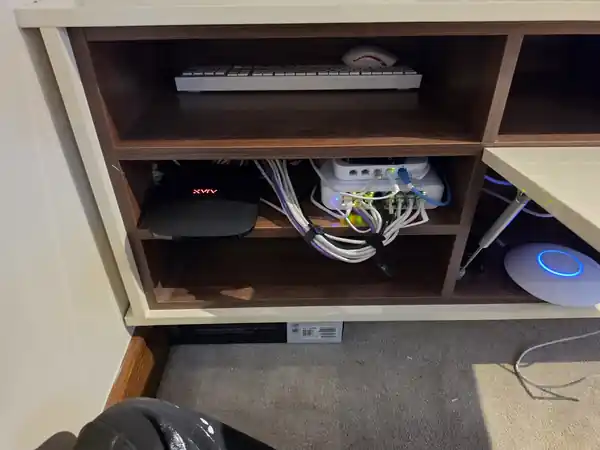
What should be checked before handover?
- Physical work: mounting, ventilation, access, lead condition and readable labels.
- Connectivity: affected outlets, uplinks, expected link speeds and appropriate cable tests within the agreed scope.
- Powered devices: access points, phones and cameras receive the required power and recover correctly.
- Business functions: the agreed printers, EPOS, staff access and other affected services work after the changes.
- Records: update the patch schedule, equipment list, configuration record and known limitations as agreed.
Record unresolved faults separately instead of presenting a neat finish as proof that every problem has gone. If users still report dropouts, our business network troubleshooting guide explains how to isolate the cause.
What to send when asking for an assessment
Send clear photographs of the cabinet, a description of any faults, the working hours that matter and whatever patching records you have. Avoid including passwords or other sensitive labels in shared photographs. Tell us whether the objective is easier maintenance, a specific repair, more capacity or a planned change of premises.
If the whole network needs reconsidering, the small-business network setup guide puts the cabinet in context. A tidy is successful when the next fault or change is easier to handle, not simply when the doors close on a better-looking bundle of leads.
Clear written quotation before any chargeable work. Short-notice appointments may be available across Stockport, Greater Manchester and Cheshire.