
A complete AV system around the distribution
For screens, meeting spaces, signage or practical background audio, see Commercial AV Installation. For a residential TV or projector and sound system, see Home Cinema & Media Rooms. Source routing and signal transport remain part of the HDMI distribution scope described here.
One source, several screens — without guessing the cabling method
HDMI distribution is the job of getting the picture and sound from a source device to the screen or screens that need it. The source might be a Sky box, media player, CCTV recorder or another HDMI device. The mistake is assuming every building needs the same extender, matrix or cable.
We first establish what needs to be shown where, whether every screen needs the same source, what resolution and control requirements matter, and whether useful Cat6 or coax already reaches those locations. If all you actually need is another aerial or Freesat-fed TV outlet, that remains our additional TV points and signal-distribution service, not an HDMI distribution job.
- Sky, media-player and other HDMI source distribution
- Remote TVs where the source equipment stays centrally located
- Homes with useful existing Cat6 or coax cabling
- Multiple displays showing one common source
- Multi-source / multi-screen systems where matrix routing is justified
- Commercial displays where a central source needs distributing cleanly
Real EDD HDMI distribution installation
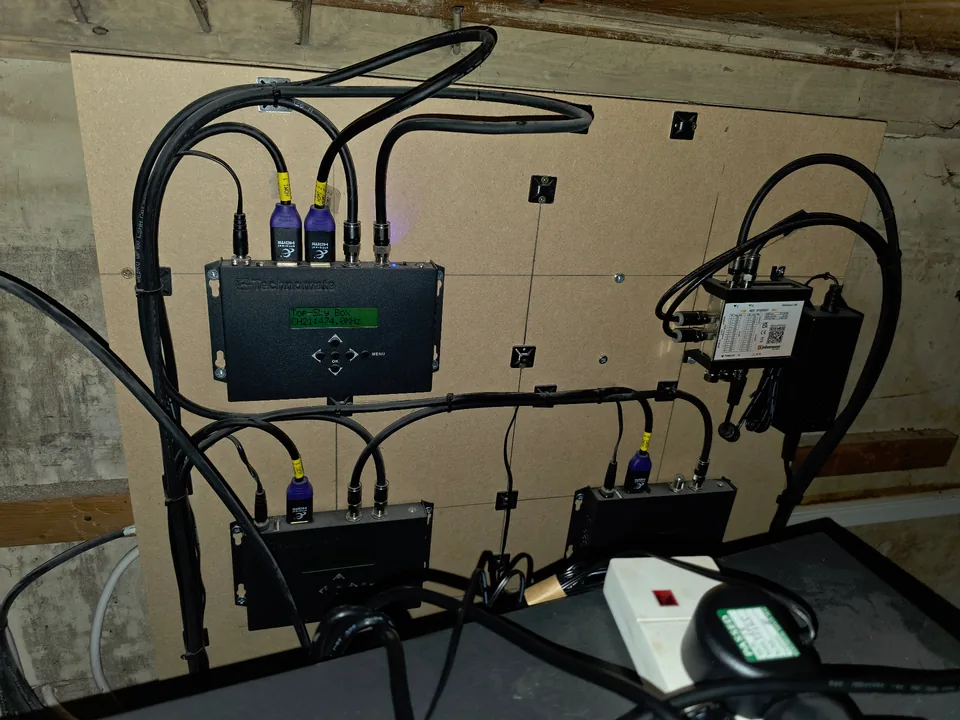
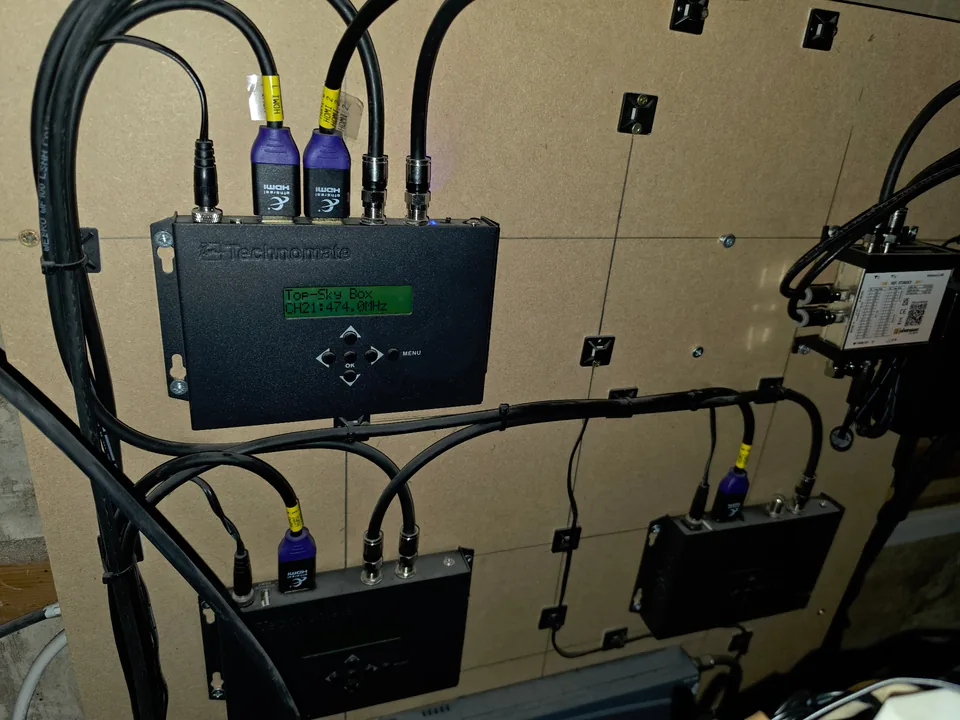
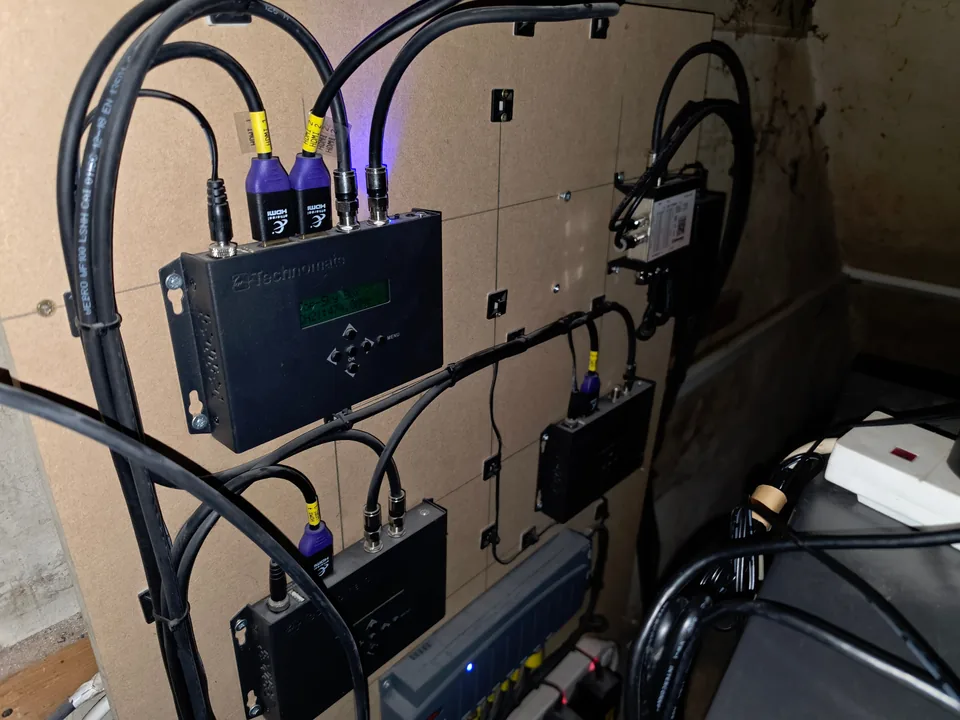
These are genuine Evolution Data & Digital installation photographs. This particular system used Technomate HDMI-to-DVB-T/RF modulators to put HDMI sources onto suitable existing coax distribution — it is not being presented as an HDMI-over-Cat6 job. The useful lesson is that the best distribution method depends on the cabling already in the building and what each screen needs to receive.
There is not one universal HDMI distribution method
The right system depends on the building. A short direct HDMI run can be the simplest answer. A remote screen with a dedicated structured-cabling route may suit an HDMI extender over Cat6. A property with good coax already reaching every television may be better served by HDMI-to-DVB-T/RF modulation. Several sources feeding several displays may justify a matrix. We choose the architecture from the actual job rather than selling one box for every property.
- Direct HDMI where the run and route make sense
- HDMI extenders over suitable dedicated Cat6 / Cat6a links
- HDMI-to-DVB-T/RF modulation over suitable coax distribution
- Splitters for one source mirrored to several compatible outputs
- Switching or matrix routing for more complex source/display requirements
- IR or other source-control methods only where the selected hardware supports them
HDMI over Cat6 — useful when the structured cabling is in the right place
Cat6 can provide a practical path between a central equipment position and a remote television when the chosen HDMI extender is designed for that type and length of link. It is especially useful during renovations, commercial fit-outs or properties where structured cabling already reaches the display positions.
We do not quote a universal distance or resolution from the cable category alone: the transmitter, receiver, cable construction, termination, source, display and video format all form part of the signal chain. Where a new structured-cabling route is required, see our Cat6 and structured data cabling service.
HDMI over existing coax — when the TV wiring is worth reusing
A good existing coax network can sometimes be far more useful than ripping the property apart for a new cable. Suitable HDMI-to-DVB-T/RF modulation equipment converts the HDMI source into a digital TV channel that compatible televisions can tune from the coax system. That is the architecture shown in our genuine installation photographs above.
It is not the same as extending native HDMI point-to-point, so we check the distribution amplifiers, splitters, coax condition, television compatibility and source-control requirement before deciding it is the right approach. Read our guide to HDMI over Cat6 vs existing coax for the practical differences.
Splitter, switch or HDMI matrix?
These devices solve different problems. A splitter takes one source and duplicates it to more than one output. A switch chooses between several sources for an output. A matrix is used when several sources need to be routed independently to several displays. The more complex option is not automatically the better one — if every screen only needs the same source, a full matrix can be unnecessary complexity.
Sky Q on multiple TVs — mirrored source or independent viewing?
HDMI distribution can make the output of one Sky Q box available elsewhere, but those televisions are still viewing the output of that one box. Changing the channel changes the source being distributed. If different rooms need different Sky channels at the same time, that is a different requirement and Sky's own Multiscreen / Sky Q Mini system is designed for independent viewing.
We explain the distinction in our guide to using existing coax to distribute a Sky Q source.
Homes, offices, hospitality and multi-screen spaces
The same design principles apply whether the displays are in bedrooms, reception areas, meeting rooms, pubs, gyms or other multi-screen spaces: define the sources, decide which displays need which source, establish the cabling route, then choose equipment that suits that requirement. We do not present every multi-screen job as a full smart-home or commercial AV project if a simpler distribution path will do the job.
Reuse useful infrastructure before adding more
Existing Cat6 and coax are assets when they are correctly installed and suitable for the chosen system. We would rather establish what can genuinely be reused than default to opening walls for another cable. Where the project is part of a wider integrated home, the video distribution can also be planned alongside the network, Wi-Fi and control system through our smart-home design and installation service.
Requirements and handover schedule
Before quoting, we record the exact source-to-screen chain and confirm the content provider's terms permit the intended use. Cable type alone cannot prove support for a format: the source, distribution hardware, receivers, displays, firmware, EDID/HDCP behaviour and audio path all have to work together.
The agreed schedule then becomes the installation and handover checklist, so there is a shared record of what was specified, what was tested, how users control it and where ongoing support begins and ends.
- Content rights, provider terms and whether viewing is domestic, hospitality or commercial
- Every source, destination display and the exact hardware chain between them
- Required resolution, refresh rate, HDR, HDCP/EDID behaviour and audio formats
- Acceptable latency, lip-sync expectations and source-control method at each screen
- Network access, credentials, firmware and security ownership for connected equipment
- Test results for each source/display route, including audio and remote control
- User training, labelled connections and a concise system diagram at handover
- Warranty, support contact, exclusions and responsibility for third-party subscriptions
What affects the quotation
The scope depends on the number of sources and displays, whether the screens need the same or different content, the available Cat6/coax/HDMI routes, access to the equipment positions, the video formats that need supporting and whether source control is required from remote rooms. We assess that combination before specifying the distribution hardware rather than advertising a one-size-fits-all package price.